Timely

UX Research · Product Design

Role
UX Researcher & Designer
Audience
College students with ADHD
Surface
Mobile app + physical timer
Project
Team design concept
Timely timer screen with a custom duration and structured focus modes
Timely phone-distance prompt with a green physical timer concept
Timely / App and physical timer concept

Overview

A task-planning app and physical timer designed to help college students with ADHD begin manageable focus sessions.

Students were already using reminders, checklists, and personal routines to navigate academic work. Timely builds on those strategies: choose one task, give it a time boundary, and start a session at your own pace.

I contributed to interviews, research synthesis, app design, physical-timer design, and user testing as part of the team.

The design challenge

Create enough structure to make a task manageable, while leaving room for individual routines and energy.

Our initial brief explored how to support students with learning disabilities in college. Focusing on ADHD led us to examine everyday work: how students planned assignments, sustained attention, and balanced study with rest. The opportunity was to support a workable next step without prescribing one productivity routine.

01 — Research

We explored academic challenges alongside the strategies students had already developed.

The team combined a survey and interviews with activities that made routines and task planning visible. The research presentation reported 20 survey respondents.

Research methods and areas of inquiry
MethodWhat we explored
Secondary researchAcademic barriers, ADHD, and access to support
SurveyDiagnosis, accommodations, tools, and social barriers
InterviewsPersonal routines, motivation, and existing strategies
Card sorting & rankingDifficult academic situations and helpful resources
Diary activitiesDaily routines and annotated study-space photos
Visual schedulesHow students approach assignments and organize time

02 — Synthesis

Three patterns shaped the direction: time boundaries, flexibility, and friction in existing tools.

Defined time made work more concrete.

Research notes described motivation around defined work periods and smaller task intervals. Different assignments also required different planning approaches.

Design direction → Pair one task with an adjustable duration.

Personal routines needed room to change.

Interview notes emphasized flexibility and self-compassion, while pressure and punishment were described as sources of stress.

Design direction → Offer a choice of pace instead of requiring one fixed rhythm.

Tools could help and add effort.

Reminders and task-management tools were useful, but complex platforms and login requirements were also identified as barriers.

Design direction → Keep task selection and session setup close together.

03 — App flow

Choose a rhythm. Set one task. Begin.

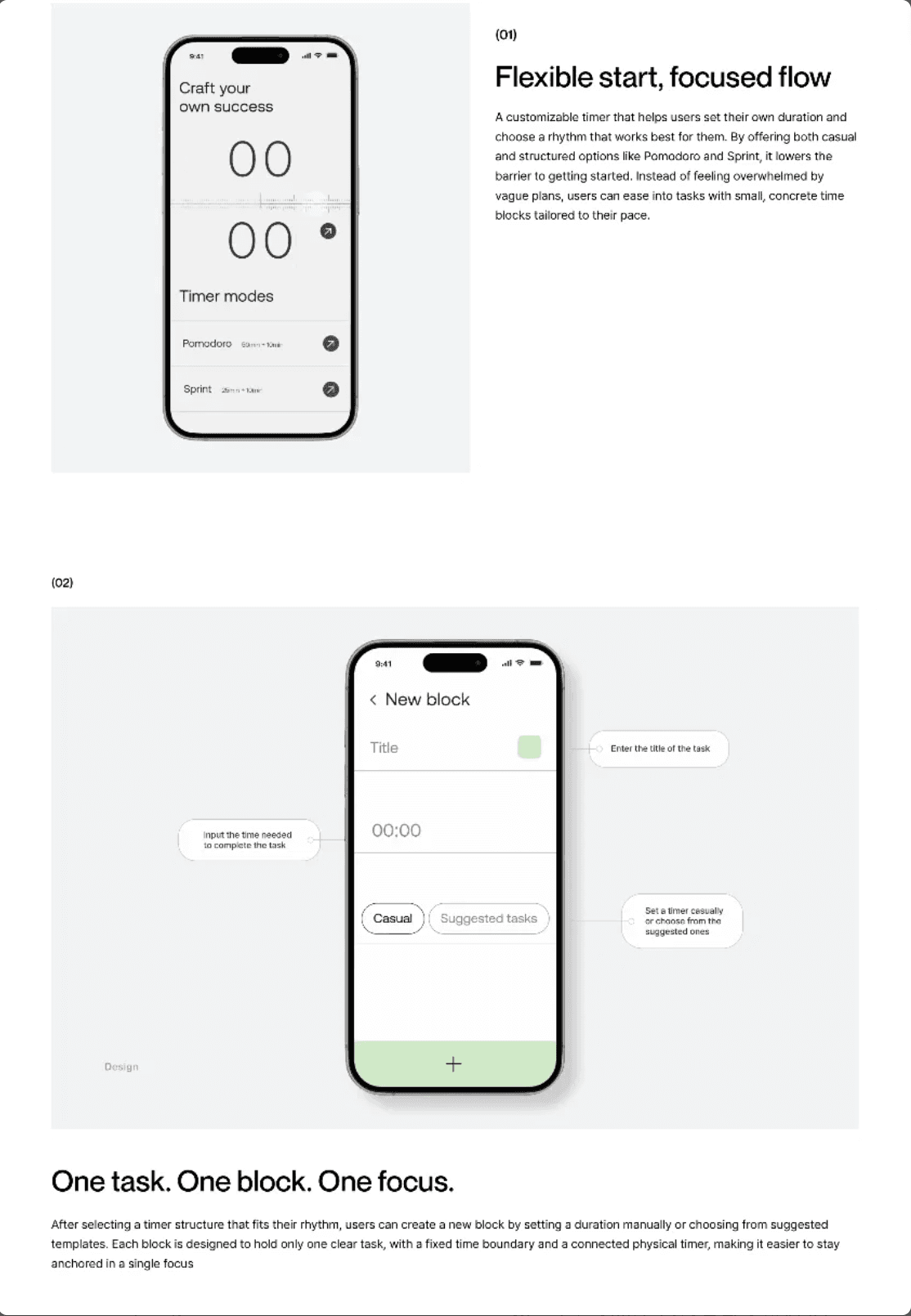
The app concept translates the research direction into a short setup flow. Students can set their own duration or choose a mode, then create a block with one task and a clear time boundary.

Timely timer screen with a custom duration and structured focus modes
Choose a custom duration or a structured focus mode.

Preset structure, personal control.

A preset gives students a starting point. Custom time leaves room for different tasks, routines, and energy levels.

A clear purpose for each session.

A block makes the purpose of the session explicit. It gives the student a defined piece of work to focus on.

Timely task block screen with task title, duration, and task selection annotations
The task block brings the title, duration, and task-selection options into one screen.

Connect a reminder to the next action.

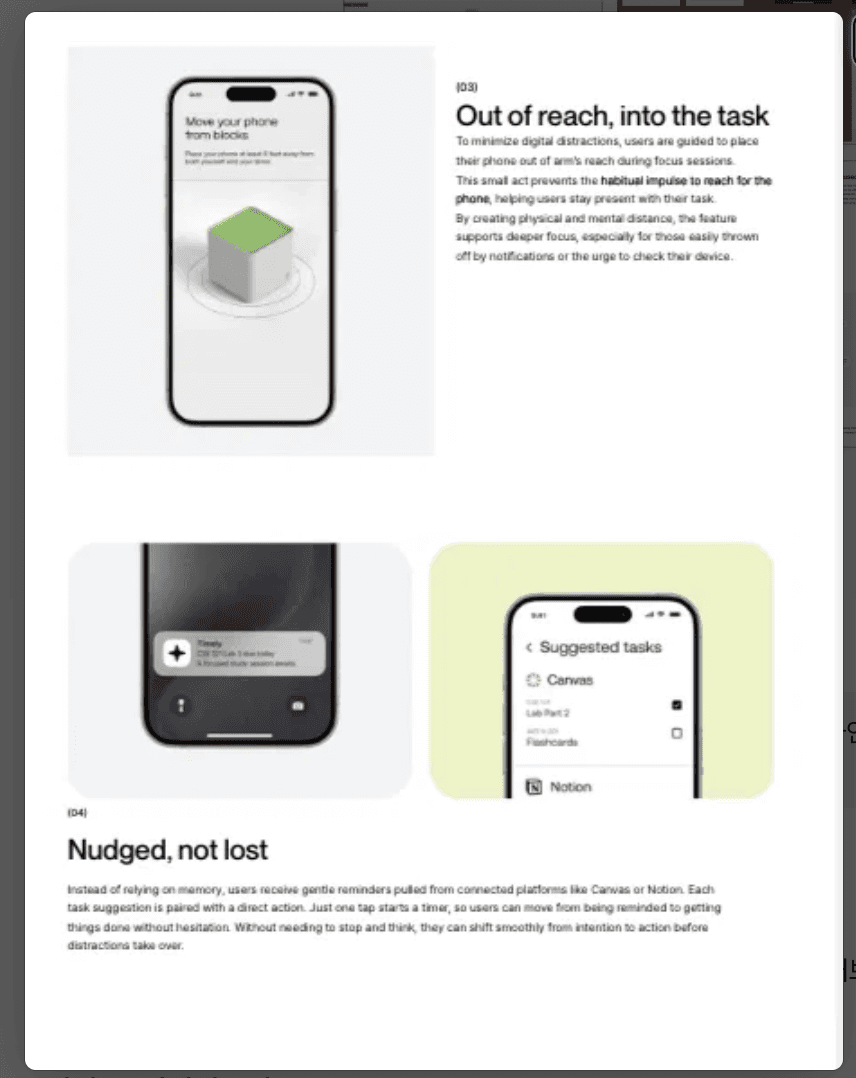
The designs also explore task suggestions from Canvas and Notion. These proposed integrations aim to reduce repeated task entry and connect a reminder with session setup.

Timely task reminder and suggested tasks from Canvas and Notion
Task reminder and suggested-task concepts.

04 — Physical interaction

The timer moves the focus cue outside the phone.

Interview notes suggested that study environments mattered: one participant described working more productively in a library than in a comfortable room. The physical timer extends this environmental direction into a tangible cue, paired with a prompt to place the phone away.

Timely phone-distance prompt with a green physical timer concept
The app introduces a physical timer and phone-distance prompt.

A hypothesis to evaluate

A cue outside the phone may support a focus session. The next iteration should examine whether that benefit outweighs the effort of carrying and connecting another device.

Outcome & next iteration

The project produced an app flow and physical timer concept. I also participated in user testing.

The redesign will focus on the experience of starting and adjusting a session: beginning without account integrations, taking a break or changing the duration, and understanding the physical timer’s role.

The research gives the concept a direction. Further evaluation is needed to understand its effect on everyday study habits.

© Rae KimLet’s chat ↗